
HVAC Website Design Checklist for Maximum Conversion Rate
A comprehensive checklist covering page speed, mobile optimization, trust signals, service pages, calls-to-action, online booking, and UX improvements that turn more visitors into paying customers.
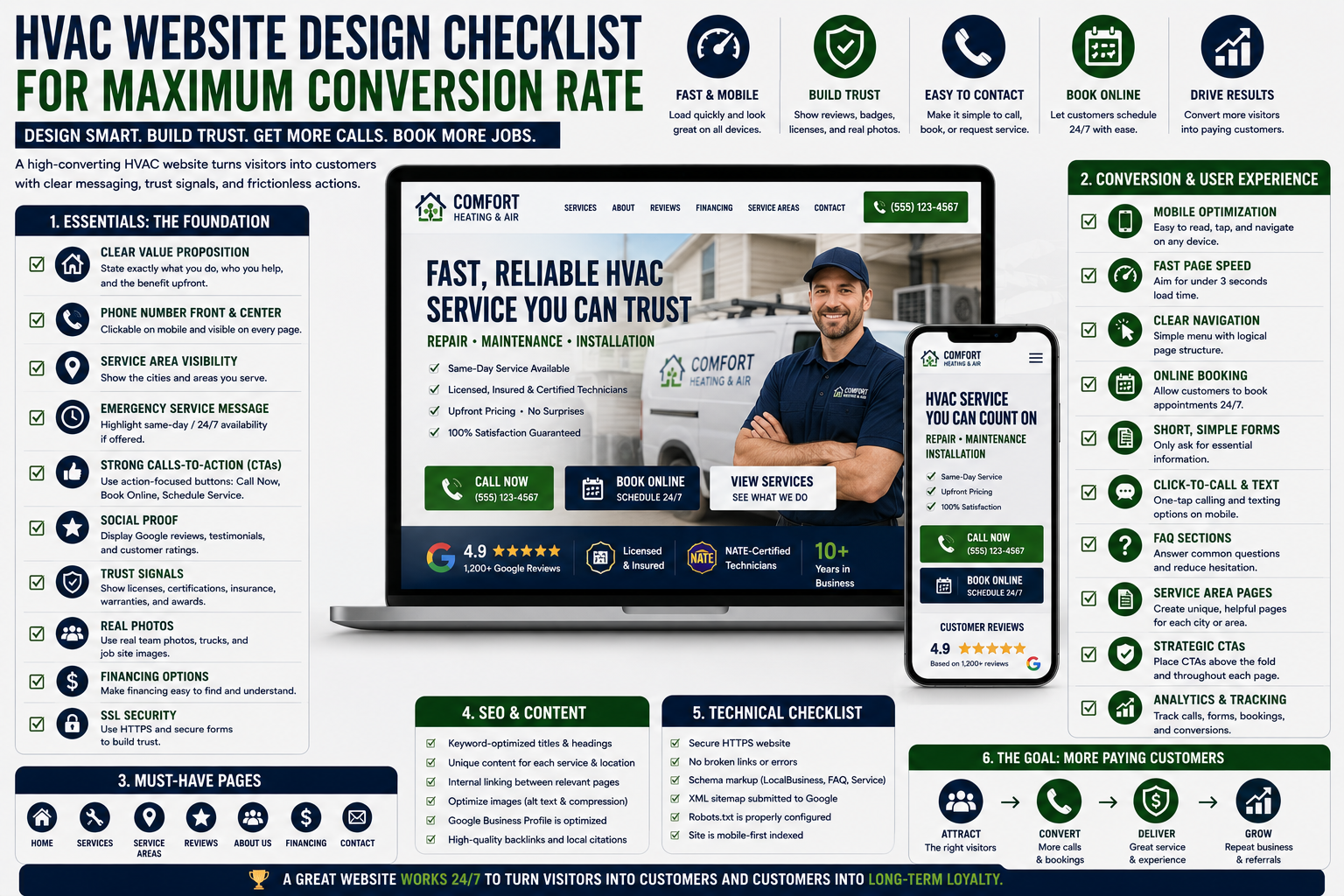
Table of Contents
Introduction
A lot of HVAC websites look fine.
They have a logo.
They have a few service pages.
They have a phone number somewhere in the header.
They may even rank on Google.
But they still do not turn enough visitors into calls.
That is a conversion problem.
Your website does not need to win design awards.
It needs to help a homeowner answer a few questions quickly:
- Can this company help me?
- Do they serve my area?
- Can I trust them?
- How do I contact them?
- Can they come today?
- What happens next?
If the website makes those answers hard to find, visitors leave.
And when someone with a broken AC leaves your website, they usually call another company.
The goal is not more traffic.
The goal is more booked jobs from the traffic you already have.
What Is HVAC Website Conversion Rate?
Your conversion rate is the percentage of website visitors who take a meaningful action.
For an HVAC company, that may include:
- Calling your office
- Filling out a contact form
- Booking online
- Requesting a quote
- Scheduling maintenance
- Applying for financing
- Sending a text message
- Asking for emergency service
For example, if 1,000 people visit your website and 40 call or submit a form, your conversion rate is 4%.
A website with strong traffic but weak conversion can waste a lot of marketing money.
You may be paying for Google Ads, SEO, Local Services Ads, social media, or referrals only to send customers to a website that does not make action easy.
Start With the Homepage
Your homepage should immediately explain what your company does and who you serve.
A visitor should understand the basics within a few seconds.
Your homepage should clearly show:
- Main HVAC services
- Service area
- Phone number
- Emergency availability
- Primary call to action
- Customer reviews
- Trust signals
- Financing options
- Online booking option
- Why customers should choose you
Avoid vague headlines like:
“Comfort You Can Trust”
That may sound polished, but it does not tell the visitor what you actually do.
A stronger headline is more direct:
Fast HVAC Repair, Maintenance, and Installation in [Your City]
That tells the customer what service you provide and where you provide it.
Make Your Phone Number Impossible to Miss
A lot of HVAC customers are not browsing for entertainment.
They need help.
Their AC is not cooling.
Their furnace stopped working.
Their system is leaking.
They want to call someone now.
Your phone number should be visible:
- In the top header
- On mobile
- Near major calls to action
- On service pages
- In the footer
- On emergency service pages
On mobile, make the phone number click-to-call.
Do not make customers copy and paste it.
Do not hide it behind a contact page.
Every extra step lowers conversion.
Use Clear Calls to Action
A call to action tells the visitor what to do next.
Good HVAC calls to action include:
- Schedule Service
- Call Now
- Book Online
- Get a Free Estimate
- Request Maintenance
- Get Emergency Help
- See Financing Options
- Claim Your Appointment
Avoid weak buttons like:
- Learn More
- Submit
- Click Here
- Contact Us
Those are not always wrong, but they do not tell the customer what they are getting.
A stronger call to action creates clarity.
For example:
Schedule Same-Day AC Repair
That is more specific than:
Contact Us
Use calls to action throughout the website, not only at the bottom of the page.
Make the Website Mobile-Friendly
Most homeowners will visit your website from a phone.
If the mobile experience is frustrating, they will leave.
A mobile-friendly HVAC website should have:
- Fast loading speed
- Large click-to-call buttons
- Easy navigation
- Short forms
- Readable text
- Visible calls to action
- No tiny buttons
- No pop-ups that block the screen
- Online booking that works on mobile
- Simple contact options
Test your website from your own phone.
Try to book a service call.
Try to call the office.
Try to find emergency service.
Try to read a service page.
If it feels difficult for you, it feels difficult for customers.
Improve Page Speed
Slow websites lose customers.
A homeowner with no cooling is not going to wait around for a heavy page to load.
Common causes of slow websites include:
- Huge image files
- Too many scripts
- Cheap hosting
- Poorly built themes
- Too many plugins
- Autoplay videos
- Uncompressed photos
- Unnecessary animations
- Bloated page builders
Your website should load quickly on both desktop and mobile.
Focus on:
- Compressing images
- Using modern image formats
- Removing unnecessary plugins
- Improving hosting
- Reducing scripts
- Limiting large animations
- Cleaning up unused page elements
Speed helps conversion.
It can also support SEO.
Build Service Pages for Real Customer Searches
A generic “Services” page is not enough.
Customers search for specific problems.
They search for:
- AC repair
- Furnace repair
- Heat pump repair
- HVAC maintenance
- Air conditioner replacement
- Furnace installation
- Ductless mini-split installation
- Indoor air quality
- Thermostat repair
- Emergency HVAC service
Each major service should have its own page.
A strong service page should include:
- Clear service headline
- Who the service is for
- Common problems you solve
- What customers can expect
- Service area
- Reviews
- Calls to action
- FAQ section
- Financing information when relevant
- Related services
- Online booking or contact options
The page should be written for homeowners, not only search engines.
A strong HVAC SEO strategy starts with service pages that match what local customers actually search for.
Build Location Pages Carefully
If you serve multiple cities, location pages can help customers and search engines understand where you work.
For example:
- AC Repair in [City]
- Furnace Repair in [City]
- HVAC Maintenance in [City]
- Heat Pump Installation in [City]
But do not create thin pages that only swap out city names.
That creates weak content and does not help customers much.
A good location page should include:
- Local service details
- Real photos when possible
- Customer reviews from the area
- Services offered in that city
- Local neighborhoods served
- Emergency availability
- Relevant FAQs
- Clear contact options
The goal is to create useful pages for real customers in real markets.
Add Trust Signals Everywhere
Customers are inviting your company into their home.
They want proof that you are legitimate.
Trust signals can include:
- Google reviews
- Customer testimonials
- Licensing information
- Certifications
- Insurance information
- Years in business
- Technician photos
- Team bios
- Real truck photos
- Financing partners
- Warranty information
- Membership plans
- Before-and-after photos
- Awards
- Local affiliations
Do not hide all trust signals on one “About Us” page.
Use them throughout the website.
Add reviews near booking buttons.
Add warranty information near replacement pages.
Add licensing and insurance details near service calls.
Trust should show up at the moment the customer is deciding whether to contact you.
Add Reviews to Key Pages
Reviews are one of the strongest conversion tools on an HVAC website.
A homeowner may not know anything about your company.
But they understand what other customers say.
Use reviews on:
- Homepage
- Service pages
- Location pages
- Financing pages
- Maintenance membership pages
- Contact page
- Replacement pages
Use specific reviews when possible.
For example, a review about a fast AC repair works well on an AC repair page.
A review about a smooth installation works well on a replacement page.
Generic five-star badges help.
Detailed customer stories help more.
A consistent process for getting more HVAC reviews gives your website fresh proof that customers can actually trust.
Make Online Booking Easy
Some customers want to call.
Others would rather book online after hours.
Your website should support both.
A good online booking process should be:
- Easy to find
- Mobile-friendly
- Short
- Clear
- Fast
- Connected to your schedule
- Confirmed by text or email
Do not ask for too much information up front.
For most service requests, you need:
- Name
- Address
- Phone number
- Service needed
- Preferred appointment time
- Brief description of the issue
You can collect more details later.
The goal is to make it easy for the customer to start the process.
Use Emergency Messaging Carefully
Emergency service can be a strong conversion angle.
But do not promise what your company cannot deliver.
If you offer emergency service, make it clear:
- When it is available
- Which issues qualify
- How customers should contact you
- Whether after-hours pricing applies
- What response time customers can expect
Good emergency messaging may include:
Need AC Repair Today? Call Now for Fast Service in [City].
That is clear.
Avoid vague claims like:
We Are Always Here for You
If the office is not staffed 24/7, that can create frustration.
Add Financing Where It Matters
Financing can help customers approve larger jobs.
It is especially useful on:
- System replacement pages
- Heat pump installation pages
- AC installation pages
- Furnace installation pages
- Repair pages with major-ticket options
- Estimate pages
Make financing easy to find.
Do not bury it in the footer.
Customers who are worried about cost may leave before calling if they do not know financing is available.
You do not need to show every financing detail on the page.
But make it clear that flexible payment options exist.
Improve Contact Forms
Long forms reduce conversions.
A homeowner with no cooling does not want to fill out a 15-question application.
Keep service-request forms simple.
A basic form should include:
- Name
- Phone number
- Address
- Service needed
- Short message
You can ask for more information after booking.
Make sure the form confirms submission clearly.
The customer should know:
- Their request was received
- When they can expect a response
- Whether they should call for urgent service
- What happens next
A form submission without confirmation feels like sending a message into a black hole.
Make the Contact Page Useful
Your contact page should do more than display a form.
Include:
- Click-to-call number
- Online booking
- Emergency service instructions
- Business hours
- Service area
- Map if relevant
- Text-message option if available
- Email address
- Review links
- Financing information
- Clear next steps
The contact page should reduce uncertainty.
The customer should not have to guess what happens after they reach out.
Use Photos of Real People and Real Work
Stock photos are not always bad.
But real photos usually build more trust.
Use photos of:
- Your technicians
- Your trucks
- Your office
- Install work
- Maintenance visits
- Before-and-after jobs
- Team events
- Local homes and neighborhoods
- Equipment you install
- Real customer interactions
Real photos make the company feel more credible.
They also help visitors recognize your team when someone arrives at the home.
Add FAQs to High-Intent Pages
FAQs help customers who are close to making a decision.
For example, an AC repair page may answer:
- How quickly can you come out?
- Do you offer same-day service?
- How much does an AC diagnostic cost?
- Do you repair all brands?
- Do you offer financing?
- What areas do you serve?
- Can you repair older systems?
- What should I do before the technician arrives?
FAQs reduce hesitation.
They also make service pages more useful.
Reduce Distractions
A website should guide the visitor toward a next step.
Too many pop-ups, menus, animations, sidebars, and unrelated offers can make the site feel confusing.
Avoid:
- Multiple competing calls to action
- Huge menus
- Auto-playing videos
- Pop-ups that appear immediately
- Unnecessary sliders
- Too much text above the first call to action
- Confusing navigation
- Too many colors and design styles
A clean page usually converts better than a busy page.
Track Website Conversion Data
You cannot improve conversion if you do not know what visitors are doing.
Track:
- Phone calls
- Form submissions
- Online bookings
- Click-to-call activity
- Financing page visits
- Service page performance
- Mobile versus desktop conversions
- Traffic source
- Bounce rate
- Time on page
- Conversion rate by page
- Conversion rate by channel
For example, Google Ads traffic may convert differently than SEO traffic.
A location page may perform differently than a service page.
The goal is to find out where visitors are leaving and what pages create real calls.
For paid traffic, the reporting should connect to campaign-level performance, not just form fills. Google Ads for HVAC contractors covers how to track calls, bookings, revenue, and margins from ad campaigns.
Website Design Checklist
Use this checklist as a starting point.
Homepage
- Clear HVAC service headline
- Service area visible
- Phone number visible
- Emergency messaging if applicable
- Main call to action above the fold
- Reviews visible
- Online booking available
- Financing mentioned
- Trust signals included
- Mobile-friendly layout
Service Pages
- One clear service focus per page
- Strong service headline
- Clear customer benefits
- Common problem explanations
- Reviews
- Calls to action
- FAQ section
- Financing options where relevant
- Related services
- Local service-area details
Conversion Elements
- Click-to-call phone number
- Online booking
- Short contact forms
- Clear buttons
- Fast response expectations
- Customer reviews
- Financing options
- Emergency instructions
- Trust badges
- Confirmation after form submission
Technical Performance
- Fast mobile load speed
- Compressed images
- Mobile-friendly buttons
- Easy navigation
- No broken forms
- No broken links
- Secure HTTPS connection
- Clear analytics tracking
- Search Console connected
- Conversion tracking configured
Common HVAC Website Mistakes
Making the Website About the Company Instead of the Customer
Customers care about whether you can solve their problem.
Lead with the service and the outcome.
Hiding the Phone Number
If the customer cannot find how to contact you quickly, they will leave.
Using Generic Calls to Action
Tell visitors exactly what to do.
Ignoring Mobile Users
Most urgent HVAC searches happen from phones.
Having One Generic Services Page
Customers search for specific services.
Create pages for the services you want to sell.
Showing No Proof
Reviews, certifications, photos, warranties, and financing all build trust.
Tracking Traffic But Not Conversions
Traffic is not the goal.
Booked jobs are.
FAQ
What makes a good HVAC website?
A good HVAC website is fast, mobile-friendly, easy to contact, clear about services and service areas, full of trust signals, and designed to guide visitors toward calling, booking, or requesting service.
How can HVAC companies improve website conversion rates?
Improve conversion by making phone numbers visible, using strong calls to action, adding reviews, improving mobile speed, simplifying forms, offering online booking, showing financing, and building clear service pages.
Should HVAC companies offer online booking?
Yes, when the booking process is simple and connected to your operations. Online booking helps customers who prefer not to call or need to schedule after hours.
What pages should an HVAC website have?
At a minimum, include a homepage, service pages, location pages, contact page, financing page, maintenance membership page, reviews page, about page, and helpful blog content.
Final Thoughts
Your HVAC website does not need to be complicated.
It needs to make customers feel confident enough to take the next step.
Show what you do.
Show where you work.
Make it easy to call.
Make it easy to book.
Build trust with reviews and proof.
Keep the site fast.
Track what converts.
A better website can turn the same amount of traffic into more booked jobs without increasing your ad budget.
Continue Reading
- Best HVAC Lead Generation Strategies That Actually Work
- HVAC Marketing Strategy: A Complete System for Steady Job Flow
- How HVAC Companies Can Generate Consistent Leads with SEO in 2026
- Google Ads for HVAC Contractors
- How to Get More HVAC Reviews
- Why HVAC Marketing Agencies Fail
- Local Services Ads for HVAC Companies