
CRM vs Spreadsheet: What HVAC Companies Should Actually Use
Compare CRMs and spreadsheets for managing customers, estimates, follow-ups, and service history to determine which solution best supports business growth.
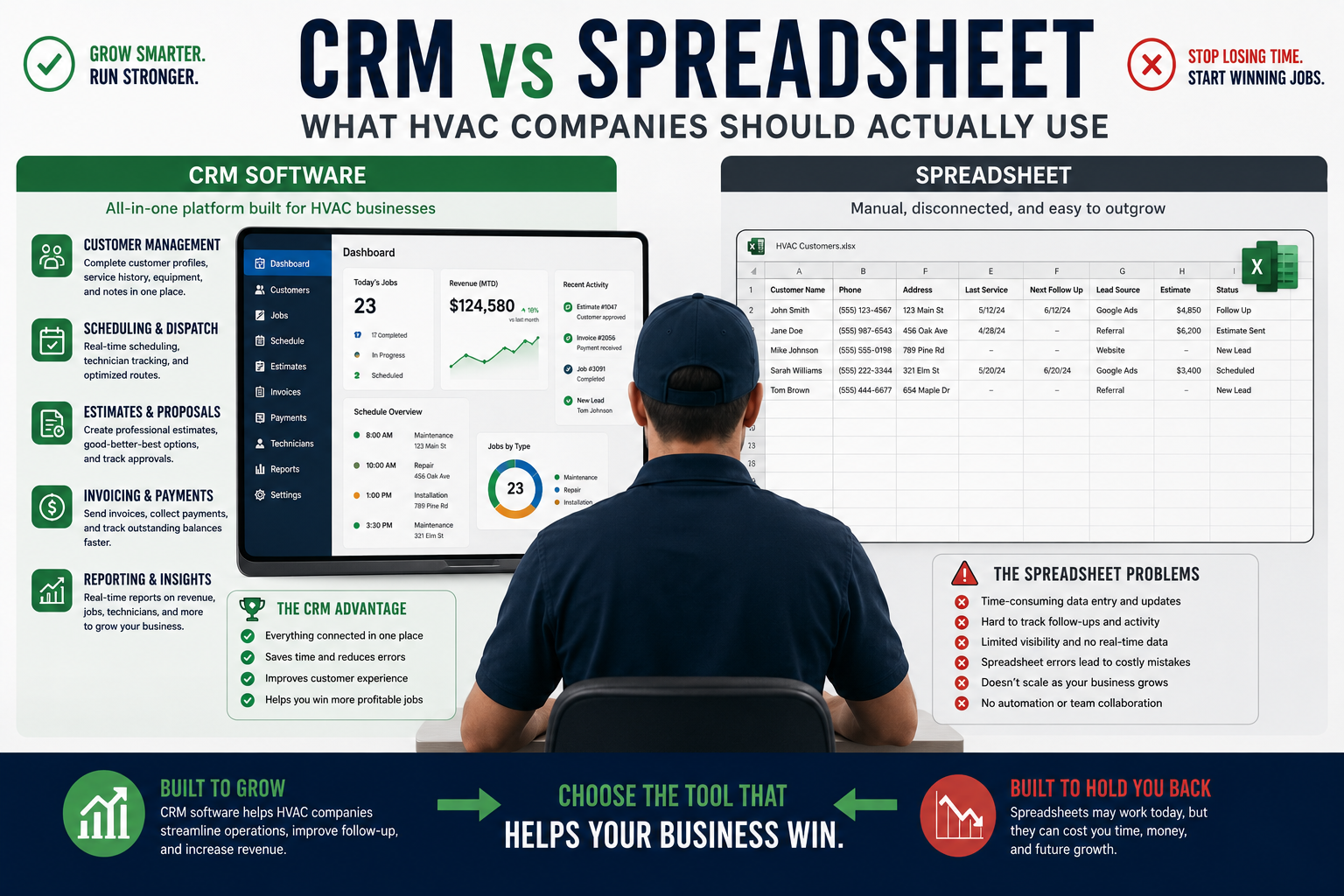
Table of Contents
Introduction
A spreadsheet is not bad software.
For a small HVAC company, it can be useful.
It can track leads, estimates, maintenance customers, equipment, invoices, technician productivity, and a lot more.
The problem starts when the spreadsheet becomes the operating system for the whole business.
Customer notes live in one tab.
Estimates live in another.
The schedule is on a whiteboard.
Invoices are somewhere else.
Technicians text the office for job history.
Nobody knows which estimates need follow-up.
That is when the spreadsheet stops helping.
It starts costing money.
The question is not:
“Are spreadsheets good or bad?”
The better question is:
“Is our spreadsheet still helping us run the business, or are we starting to outgrow it?”
For a one-truck company, spreadsheets can work.
For a growing HVAC company, they usually become a bottleneck.
What Spreadsheets Are Good For
Spreadsheets are useful because they are flexible.
You can build almost anything.
For a small HVAC company, a spreadsheet may help track:
- Leads
- Estimates
- Customer contact information
- Maintenance customers
- Equipment details
- Callbacks
- Revenue
- Expenses
- Job costs
- Technician productivity
- Marketing performance
- Inventory
- Vendor pricing
They are cheap.
They are familiar.
Most owners already know how to use them.
That makes them a reasonable starting point.
A spreadsheet can be especially useful when the company is small and the owner is still handling most of the work personally.
Where Spreadsheets Start Breaking Down
The problem is not that spreadsheets are bad.
The problem is that they depend on people remembering to update them.
That gets harder once the business has more calls, technicians, customers, and office staff.
A spreadsheet usually starts breaking down when:
- Multiple people need access at the same time
- Customer notes are spread across tabs
- Technicians need job history in the field
- Estimates are not being followed up
- Dispatch changes all day
- Invoices are delayed
- Maintenance renewals are missed
- Customer communication is inconsistent
- The owner cannot see what is happening in real time
- Reports are built manually every week
A spreadsheet can tell you what happened after someone updates it.
A CRM helps the business manage what is happening right now.
What an HVAC CRM Does Better
A CRM helps HVAC companies manage customers, jobs, estimates, follow-up, service history, and communication in one place.
For most HVAC companies, a CRM is usually part of a field service management platform.
It may include:
- Customer records
- Equipment history
- Scheduling
- Dispatch
- Estimates
- Invoices
- Payments
- Maintenance memberships
- Technician mobile tools
- Review requests
- Follow-up reminders
- Customer communication
- Reporting
- Job history
Instead of entering customer information into a spreadsheet after the job is done, the business works from the system during the job.
The office books the call.
The technician sees customer history.
The estimate gets sent.
The invoice gets created.
Payment gets collected.
The customer receives a maintenance reminder later.
That is the difference.
A spreadsheet tracks information.
A CRM helps run the workflow.
For a broader view of the tools that combine CRM with dispatch, billing, customer history, and field operations, see field service management software for HVAC.
CRM vs Spreadsheet: Side-by-Side Comparison
| Area | Spreadsheet | HVAC CRM |
|---|---|---|
| Customer records | Manual entry and updates | Central customer profile with job history |
| Scheduling | Usually separate calendar or whiteboard | Built-in scheduling and dispatch |
| Dispatch | Manual coordination | Technician assignment and live job status |
| Estimates | Usually created separately | Estimates tied to customer and job records |
| Follow-up | Manual reminders | Automated tasks, reminders, and workflows |
| Service history | Often hard to find | Available to office and field team |
| Invoices | Usually separate accounting system | Connected to jobs and payments |
| Maintenance memberships | Manual tracking | Renewal reminders and recurring service workflows |
| Technician access | Limited in the field | Mobile app access to job and customer details |
| Reporting | Manual formulas and updates | Real-time dashboards and activity tracking |
| Scale | Gets harder with more people | Built to support more users and workflows |
The spreadsheet usually wins on flexibility.
The CRM usually wins on consistency.
For a growing HVAC company, consistency is more valuable.
The Cost of Running an HVAC Company on Spreadsheets
A spreadsheet does not come with a monthly subscription.
But it is not free.
The hidden cost shows up in mistakes.
For example:
- A lead gets missed because nobody updated the follow-up tab
- A maintenance customer never gets called
- An estimate sits for three weeks
- A technician arrives without service history
- An invoice gets forgotten
- A customer has to repeat the same problem
- A dispatcher sends the wrong technician
- The owner spends Friday afternoon cleaning up reports
- Nobody sees the callback trend until it becomes a bigger problem
Those mistakes add up.
A CRM may cost money every month.
But if it helps the company save one repair call, collect one overdue invoice, renew a few memberships, or close more estimates, it can pay for itself quickly.
The real question is not the subscription price.
It is the cost of things slipping through the cracks.
When Spreadsheets Are Still Enough
A spreadsheet can still work when the business is very small.
You may not need a CRM yet if:
- You have one truck
- The owner handles most customer communication
- You have low call volume
- The schedule is simple
- You do not have multiple office users
- You do not sell many maintenance memberships
- Estimates are easy to track manually
- Technicians do not need much customer history in the field
- You are disciplined about updating the spreadsheet
At that stage, keep it simple.
Do not buy complicated software just because you want to look like a larger company.
A small company needs tools it will actually use.
When an HVAC Company Should Move to a CRM
You should start looking at CRM software when the spreadsheet is creating operational problems.
That may happen when:
- You have multiple technicians
- The office is handling more calls
- Dispatch changes throughout the day
- Customer history is hard to find
- Estimates are going cold
- Invoices are delayed
- Memberships are slipping
- Technicians need mobile access
- You want better review requests and customer communication
- The owner cannot keep up with follow-up
- Reports take too long to build manually
A good rule:
When your business needs people to remember too many things, it is time for a system.
The right CRM does not just store information.
It reduces how much the business depends on memory.
For options organized by contractor size and operating complexity, see best HVAC CRM systems for small to large contractors.
What HVAC Companies Should Track in a CRM
Once you move beyond spreadsheets, do not just use the CRM as a customer list.
Use it to manage the important parts of the business.
Track:
- New leads
- Booked calls
- Missed calls
- Open estimates
- Estimate follow-up
- Completed jobs
- Invoices sent
- Payments collected
- Maintenance memberships
- Renewal dates
- Replacement opportunities
- Callbacks
- Reviews
- Revenue by technician
- Revenue by lead source
You do not need to obsess over every number.
You need a weekly scoreboard that shows where the business is improving and where money is leaking out.
CRM Does Not Replace a Spreadsheet Completely
Even after you move to a CRM, spreadsheets still have a place.
They can be useful for:
- Budget planning
- Compensation models
- Long-term hiring plans
- Custom reports
- Marketing experiments
- Equipment price comparisons
- Vendor analysis
- Financial modeling
- Job costing reviews
- Scenario planning
The goal is not to eliminate spreadsheets.
The goal is to stop using them for work that should happen inside the daily operating system.
A spreadsheet is a good planning tool.
It is a bad replacement for dispatch, customer history, follow-up, and job management.
Choosing the Right HVAC CRM
The best CRM depends on your company size and workflow.
For a small residential HVAC company, you may want something simple that handles:
- Scheduling
- Estimates
- Invoices
- Payments
- Customer communication
- Basic follow-up
For a growing company, you may need stronger tools for:
- Dispatch
- Price books
- Memberships
- Technician performance
- Job costing
- Reporting
- Estimate follow-up
For a larger company, you may need a broader platform that connects service, install, call booking, dispatch, reporting, and management visibility.
The important thing is not buying the biggest platform.
It is buying the one that solves the problem costing you the most money.
For side-by-side platform guidance, review best HVAC CRM software compared.
Common Mistakes HVAC Companies Make
Staying With Spreadsheets Too Long
Some owners avoid software because spreadsheets are familiar.
But once the company grows, the manual work becomes expensive.
The owner spends too much time chasing information instead of managing the business.
Moving to a CRM Without a Process
A CRM will not fix:
- Weak call handling
- Poor dispatch
- Bad pricing
- No estimate follow-up
- Weak technician communication
- No accountability
Software supports a good process.
It does not create one.
A documented HVAC workflow optimization process helps define what the CRM should support across booking, dispatch, field work, invoicing, and follow-up.
Treating the CRM Like a Digital Filing Cabinet
The CRM should not only hold customer names and invoices.
It should help manage the work that needs to happen next.
That includes follow-up, memberships, dispatch, estimates, payments, and customer communication.
Ignoring Team Adoption
The office may use the CRM perfectly.
But if technicians do not update job status, add notes, use price books, or collect payments, the system becomes incomplete.
Incomplete data creates bad reports.
Bad reports create bad decisions.
FAQ
Is a CRM better than a spreadsheet for HVAC companies?
For a growing HVAC company, yes.
A CRM is better for managing customer history, scheduling, dispatch, estimates, follow-up, invoices, payments, memberships, and technician workflows.
A spreadsheet is still useful for planning and custom analysis.
Can a small HVAC company use spreadsheets?
Yes.
A spreadsheet can work for a one-truck or early-stage company with low call volume and simple operations.
The problem starts when multiple people need the same information and too many important tasks depend on manual updates.
When should an HVAC company move from spreadsheets to CRM software?
Move when you are missing follow-up, struggling with dispatch, losing track of customer history, delaying invoices, managing multiple technicians, or spending too much time building reports manually.
What is the biggest benefit of an HVAC CRM?
The biggest benefit is having one reliable place for customer information, jobs, estimates, invoices, payments, membership status, follow-up, and service history.
Final Thoughts
Spreadsheets are not the enemy.
They are useful when the business is small and simple.
But spreadsheets do not scale well when more people, customers, trucks, estimates, and memberships enter the picture.
A CRM helps HVAC companies stop relying on memory.
It keeps customer history organized.
It helps dispatch run cleaner.
It protects follow-up.
It speeds up estimates, invoices, and payments.
And it gives the owner a clearer view of what is happening in the business.
Use spreadsheets for planning.
Use a CRM to run the daily operation.
Continue Reading
- Best HVAC CRM Software Compared
- Best HVAC CRM Systems for Small to Large Contractors
- HVAC CRM vs ERP Systems: What’s the Difference?
- All-in-One HVAC Business Software
- Field Service Management Software for HVAC: What to Look For
- HVAC Workflow Optimization: How to Remove Operational Bottlenecks
- HVAC SOPs Every Company Should Have