
HVAC Dispatch Software: Best Tools for Scheduling Technicians
Discover the top HVAC dispatch software platforms that help schedule technicians efficiently, reduce drive time, improve communication, and maximize daily job capacity.
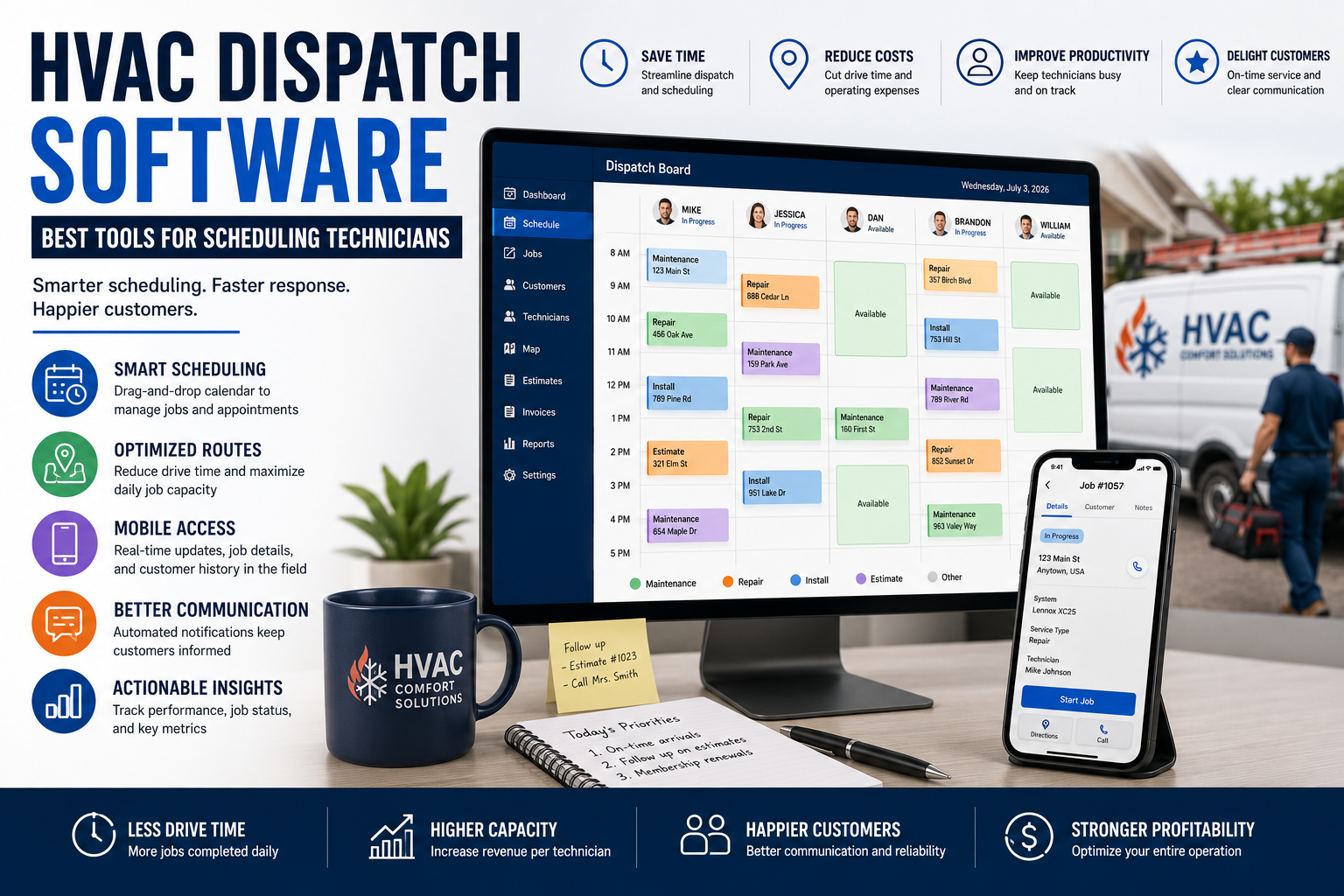
Table of Contents
Introduction
Dispatch can make or break an HVAC company.
You can have good technicians, strong demand, and a full schedule.
But if the wrong technician gets sent to the wrong job, trucks spend half the day driving, customers wait too long, and callbacks pile up, the company still loses money.
Every unnecessary truck roll costs money.
Every technician sitting in traffic costs money.
Every missed detail on a service call can turn into a second trip.
That is why HVAC dispatch software matters.
The right system helps your office see the day clearly:
- Which technicians are available
- Where they are going
- What skills they have
- What jobs are urgent
- Which customers have service agreements
- Which calls need follow-up
- Where there is room in the schedule
This guide breaks down what HVAC dispatch software should do, which tools fit different types of companies, and how to choose the right one.
What Is HVAC Dispatch Software?
HVAC dispatch software helps companies assign technicians, schedule jobs, manage routes, track job status, and keep the office and field team on the same page.
For most HVAC companies, dispatch software is part of a larger field service management platform.
It usually connects scheduling, customer history, technician mobile apps, estimates, invoices, memberships, and reporting.
The goal is not just to fill open spots on the calendar.
The goal is to send the right technician to the right customer at the right time.
A good dispatch system should help answer questions like:
- Who is closest to this call?
- Who is qualified to handle this equipment?
- Which technician is already in that area?
- Is this customer under a maintenance agreement?
- Did the customer approve an estimate last visit?
- Does this job need a senior technician?
- Which calls can fill schedule gaps?
- Which technician is running behind?
That is how dispatch protects productivity.
Why HVAC Companies Need Better Dispatch
Small HVAC companies can often run from a shared calendar.
Once you add more trucks, that gets harder.
You start managing:
- Emergency calls
- Maintenance visits
- Repair appointments
- Replacement leads
- Installation crews
- Technician skill levels
- Larger service areas
- Customers with different priorities
- Callbacks
- Same-day schedule changes
That is when dispatch starts becoming a profit issue.
A poor dispatch process creates:
- Wasted drive time
- Technicians arriving without job details
- Missed appointment windows
- Customers calling for updates
- Too many return trips
- Uneven technician workload
- Lost maintenance opportunities
- Lower daily job capacity
A good dispatch system gives the office more control before the day turns into chaos.
The Features That Matter Most
Not every HVAC company needs every feature.
But these are the ones that matter most when choosing dispatch software.
Drag-and-Drop Scheduling
The dispatch board should make it easy to see the day at a glance.
You should be able to move jobs, assign technicians, reschedule calls, and fill open time slots without creating confusion.
Look for a system that shows:
- Technician schedules
- Job duration
- Appointment windows
- Job type
- Customer location
- Technician availability
- Open schedule gaps
- Emergency jobs
- Job status
A clear dispatch board helps your office react faster when the schedule changes.
And it always changes.
Technician Skill Matching
Not every technician should be sent to every job.
A newer technician may be great for maintenance visits but not ready for a complicated heat pump issue.
A senior technician may be better suited for a difficult diagnostic, a repeat callback, or a replacement opportunity.
Your dispatch software should make it easier to see:
- Technician certifications
- Equipment experience
- Job type
- Service area
- Current workload
- Availability
- Previous customer history
The wrong technician on the wrong call can cost you a full day.
Route Planning and Drive-Time Reduction
Drive time is one of the biggest hidden costs in HVAC operations.
A technician can be fully booked and still underperform if half the day is spent crossing town.
Dispatch software should help you group jobs by area, reduce unnecessary travel, and avoid sending trucks back and forth across your service area.
That does not mean every route will be perfect.
Emergency calls happen.
Customers reschedule.
Technicians get delayed.
But the system should make poor routing easier to spot before it becomes normal.
For practical routing, scheduling buffers, and technician assignment guidance, read technician scheduling best practices for HVAC companies.
Real-Time Technician Status
The office should know whether a technician is:
- On the way
- On site
- Running late
- Waiting for approval
- Completing paperwork
- Available for another call
- Finished for the day
Without status visibility, dispatchers are forced to text or call technicians all day just to figure out where everyone is.
That wastes time for everyone.
Real-time status helps the office make better decisions when a new call comes in.
Customer History and Job Notes
A dispatcher should not assign a job without seeing basic customer information.
The system should show:
- Previous repairs
- Equipment history
- Open estimates
- Maintenance agreement status
- Warranty information
- Previous technician notes
- Customer communication history
- Payment history
This helps the dispatcher send the right technician with the right context.
It also helps the customer feel like your company knows them.
Nobody wants to explain the same problem every time they call.
Mobile Tools for Technicians
Dispatch software is only useful if technicians can use it in the field.
A strong technician app should provide:
- Daily schedule
- Customer address and contact details
- Job notes
- Equipment history
- Service agreement details
- Estimate information
- Photos and attachments
- Navigation support
- Status updates
- Customer signatures
- Payment collection
The goal is to reduce calls back to the office.
A technician should not need to ask, “What did we do last time?” or “Did this customer approve that quote?”
The more prepared the technician is, the smoother the call becomes.
For a wider checklist of mobile access, estimates, billing, customer records, and operational handoffs, see field service management software for HVAC.
Customer Notifications
Customers do not like waiting all day without an update.
Dispatch software should make it easier to send:
- Appointment confirmations
- Reminder messages
- On-the-way notifications
- Delay updates
- Reschedule notices
- Technician arrival details
Good communication reduces inbound calls to the office and helps customers feel more confident about the appointment.
That matters.
A customer may forgive a delay.
They are less likely to forgive being ignored.
Reporting and Dispatch Visibility
The owner should be able to see whether dispatch is improving or creating problems.
Look for reporting around:
- Revenue per technician
- Jobs completed per day
- Average drive time
- First-time fix rate
- Callback rate
- Missed appointments
- Technician productivity
- Schedule utilization
- Revenue per truck
- Customer wait times
You do not need a report for everything.
You need enough visibility to spot problems early.
Best HVAC Dispatch Software for Small Companies
Small HVAC companies should prioritize simplicity.
A one- to five-truck company usually needs:
- A clean dispatch board
- Customer history
- Scheduling
- Technician mobile access
- Estimates
- Invoices
- Payments
- Basic reporting
- Customer reminders
For many small teams, Jobber and Housecall Pro are good starting points because they help get scheduling, customers, jobs, invoices, and follow-up into one place.
The important thing is adoption.
A simpler system that everyone uses is better than a complex platform the team avoids.
For a wider comparison of CRM and service-platform options by company size, see best HVAC CRM software compared.
Best HVAC Dispatch Software for Growing Companies
Growing HVAC companies need more than a calendar.
Once you have multiple technicians, office staff, maintenance agreements, and a wider service area, dispatch becomes more complicated.
At this stage, look for:
- Technician skill matching
- Better route planning
- Maintenance agreement visibility
- Stronger price-book access
- Technician performance reporting
- Customer history
- Job status updates
- Estimate follow-up
- Membership tracking
FieldEdge can be a stronger fit for established HVAC companies that need more HVAC-specific structure around dispatch, service agreements, price books, and technician workflows.
Best HVAC Dispatch Software for Larger Companies
Larger HVAC companies need more control.
That may include:
- Multiple dispatchers
- Service managers
- Install managers
- Call-center staff
- Multiple branches
- Multiple departments
- High membership volume
- Commercial accounts
- Complex routing
- Deeper reporting
- Job costing
- Department accountability
At this stage, platforms like ServiceTitan may make more sense because the company needs dispatch connected to call booking, memberships, installs, reporting, marketing, and broader operational workflows.
The bigger the company gets, the more expensive disconnected systems become.
Best HVAC Dispatch Software for Commercial Contractors
Commercial HVAC dispatch is different from residential service dispatch.
Commercial companies may be managing:
- Work orders
- Service contracts
- Multiple properties
- Facility managers
- Project managers
- Service-level agreements
- Commercial billing
- Longer job durations
- Multiple technicians on one project
Commercial contractors often need stronger work-order, project, contract, and multi-site management tools.
A residential-first platform may work at the beginning.
But commercial HVAC companies often outgrow it faster.
Common Dispatch Mistakes HVAC Companies Make
Dispatching Based Only on Who Is Available
The closest available technician is not always the best technician for the job.
Skill level, job type, customer history, location, and current workload all matter.
Sending Technicians Across Town All Day
A full schedule does not always mean a productive schedule.
If technicians are spending too much time driving, the company is losing capacity.
Not Using Customer History
A technician should not arrive blind.
Previous repairs, equipment history, maintenance status, open estimates, and customer notes should all be visible before the truck rolls.
Treating Dispatch Like Admin Work
Dispatch is not just scheduling.
Dispatch affects revenue, customer experience, technician productivity, callbacks, and daily capacity.
It should be treated like an operational function, not an afterthought.
Buying Software Before Fixing the Process
Software cannot fix:
- Weak call handling
- Poor technician training
- Bad pricing
- Unclear service areas
- No customer communication
- Weak leadership
- No accountability
Software supports a good dispatch process.
It does not create one.
For a step-by-step view of connecting calls, booking, dispatch, field work, invoicing, payment, and follow-up, review HVAC workflow optimization.
How to Choose HVAC Dispatch Software
Before booking a demo, ask:
- How many technicians do we have?
- How large is our service area?
- Do we have recurring maintenance work?
- Do technicians need equipment history?
- Are callbacks a problem?
- Are we missing appointment windows?
- Are technicians spending too much time driving?
- Do we need customer notifications?
- Do we need price-book access in the field?
- Can we see technician productivity today?
Then choose the platform that solves the biggest problem first.
A small company may need a simpler platform.
A growing company may need stronger dispatch workflows.
A larger company may need a connected operating system.
The right answer depends on how much complexity you are managing now.
For a broader software framework by contractor stage, see top HVAC software tools ranked by real contractor needs.
FAQ
What is HVAC dispatch software?
HVAC dispatch software helps companies schedule technicians, assign jobs, manage routes, track job status, access customer history, and improve communication between the office, technician, and customer.
What is the best dispatch software for a small HVAC company?
For small HVAC companies, the best dispatch software is usually the one the team will actually use. Many small companies start with platforms such as Jobber or Housecall Pro because they combine scheduling, dispatch, customer records, estimates, invoices, and payments.
What should HVAC dispatch software include?
At a minimum, look for scheduling, technician assignment, customer history, job notes, mobile access, notifications, invoices, estimates, payment collection, and basic reporting.
How can dispatch software reduce HVAC drive time?
Dispatch software can help group jobs by location, show technician availability, reduce unnecessary return trips, and make it easier to assign nearby technicians to new calls.
Final Thoughts
The best HVAC dispatch software does not just help you fill the calendar.
It helps you protect technician productivity, reduce drive time, improve communication, and get more out of every truck.
A small company may only need a clean scheduling board and customer history.
A growing company may need better technician matching, memberships, price books, and reporting.
A larger company may need dispatch connected to the entire operation.
Choose software based on the problem costing you the most money today.
Not based on the flashiest demo.
Continue Reading
- Field Service Management Software for HVAC: What to Look For
- Technician Scheduling Best Practices for HVAC Companies
- Improve HVAC Dispatch Efficiency
- HVAC Workflow Optimization: How to Remove Operational Bottlenecks
- Best HVAC CRM Software Compared
- Best HVAC Software Stack for Small Business vs Enterprise
- Top HVAC Software Tools Ranked by Real Contractor Needs